OPEN SOURCE // MIT LICENSE // FREE

TrainMaster – Modern model railway control, built from real-world use

Born out of a passion for model railways and the everyday needs of a real layout: fully automatic operation, a freely designable graphical interlocking in your web browser with no need to sit at the host PC, and true hands-on control via the Elgato Stream Deck plugin and the wireless Elecrow ESP32 rotary knob (an off-the-shelf module for about $30 running our own firmware).

TrainMaster is open source under the MIT license: the software, ESP32 firmware, Stream Deck plugin and 3D-printable files are freely available on GitHub at no cost.

User interface & control concepts

Click through the different areas of TrainMaster. Every view runs responsively right in the browser. The interface itself is available in English and German.
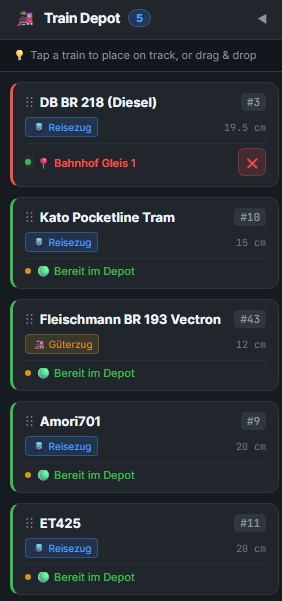
TrainMaster train depot live screenshot
Live screenshot: train depot drawer (German UI)
● Real screenshot from TrainMaster

Train depot – central train & fleet management

The control centre for your fleet: an overview of all train types, live block occupancy on the layout, and placing a train on the track in seconds by tap or drag & drop.
πŸ“ Live block occupancy & train location See at a glance where each train is: the DB BR 218 is standing on Bahnhof Gleis 1 (station track 1, highlighted in red). The ❌ button takes the train off the track and back to the depot with one click.
🟒 Ready in the depot (tap to place & drag & drop) All waiting trains (such as the Kato tram, Vectron or ET425) are shown in green and ready to go. Just tap them or drag them onto a free track in the interlocking.
πŸ“ Train lengths to the centimetre & DCC addresses TrainMaster knows the exact model length (e.g. 19.5 cm or 12 cm) – essential for automatic platform and staging-yard lengths. The digital address (#3, #10, #43) is shown directly.
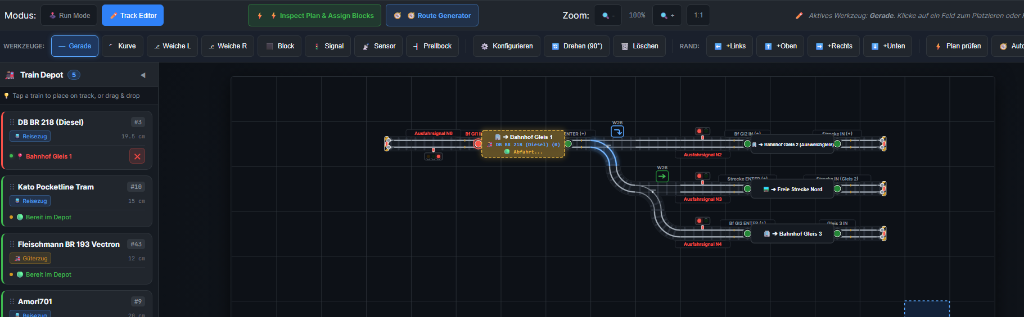
localhost:5173 β€” Track editor & layout design
Live screenshot ● Mode: track editor
TrainMaster track editor with auto-router and automatic block assignment

Track editor with smart automation

Draw your track freely on a grid in the browser – with automatic track analysis, block generation and turnout locking:
🧭 Auto-router (route generator) Calculates every safe, drivable route across complex turnout ladders at the push of a button – no more setting up every single turnout position by hand.
⚑ Automatic block assignment (inspect plan & assign) Detects connected track sections, stations (e.g. station tracks 1 & 3) and line blocks, and assigns ENTER and IN sensors automatically.
🚦 Automatic signal assignment & turnout positions Links exit signals (N1–N4) and turnouts (W2L, W2R) directly to the protected sections for real flank protection and prototypical signal aspects.
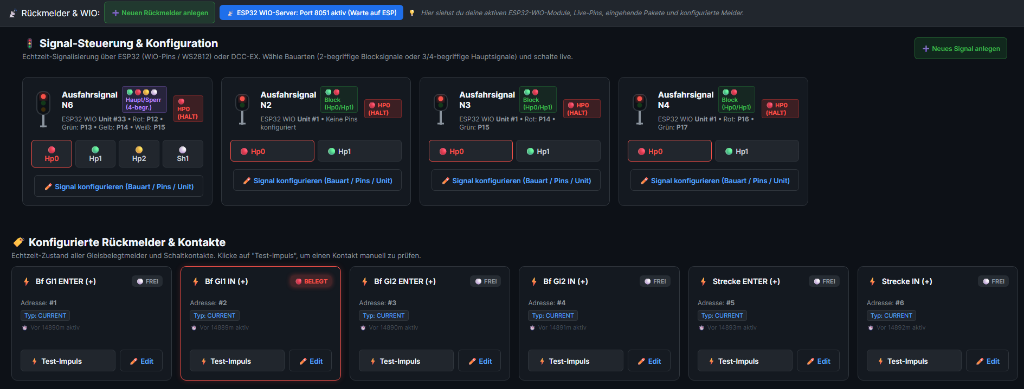
localhost:5173 β€” Signal control, feedback sensors & custom ESP32 firmware
Live screenshot ● ESP32 WIO server: port 8051
TrainMaster signal control and feedback sensor configuration with custom ESP32 firmware

Signals & feedback sensors via our own ESP32 firmware

All signals and occupancy detectors are driven within milliseconds by our optimised custom ESP32 firmware – no expensive proprietary add-on hardware required:
⚑ Built-in ESP32 WIO server (port 8051) Receives and sends live pin states and data packets wirelessly over Wi-Fi or LAN to ESP32 modules distributed around the layout.
🚦 2- to 4-aspect signal control Supports block signals (Hp0/Hp1) as well as main and shunting signals (Hp0, Hp1, Hp2, Sh1) in the German style. Freely configurable via discrete GPIO pins, WS2812 RGB LEDs or DCC-EX.
πŸ“ Live track occupancy & test pulse Real-time state of all current sensors. A built-in test pulse mode lets you check signals and contacts instantly without a moving train.
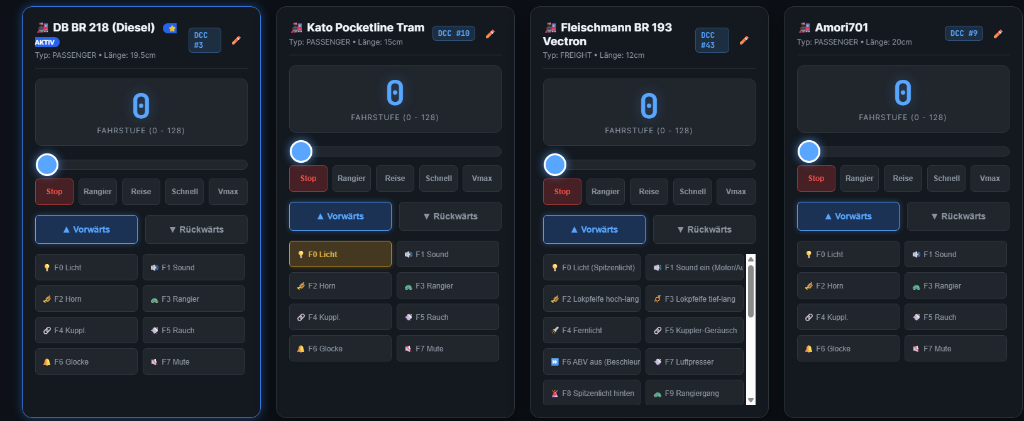
localhost:5173 β€” Digital multi-loco throttle & decoder mapping
Live screenshot ● 4 locos in the multi-throttle
TrainMaster digital throttle with multi-loco control and automatic function key mapping

Digital throttle with smart decoder & sound mapping

Control several trains at once on any device. When you add a new locomotive, its functions and sounds are labelled prototypically and given matching icons:
⚑ Automatic function key & sound mapping No more typing in 28 functions by hand: TrainMaster reads decoder manuals, sound projects or custom mapping files and assigns names and icons (πŸ’‘, πŸ”Š, 🎷, πŸ”¦, πŸ”—, ⏩, βš™οΈ, 🐒) automatically.
πŸŽ›οΈ Multi-loco throttle & quick buttons Fine speed control (128 speed steps) for as many locos as you like in parallel (e.g. BR 218, Vectron, Kato tram), with quick buttons for stop, shunting, cruise, fast and Vmax.
πŸ“± Responsive on tablet & smartphone Built for touch screens: use it as a wireless handheld throttle right at the layout – a tidy two-column layout for all sounds & functions without endless scrolling.
localhost:5173 β€” System settings, command stations & train protection
Live screenshot ● DCC-EX / Z21 / WIO active
TrainMaster system settings with DCC-EX and Z21 command stations, train protection and ESP32 WIO

System settings & multiple command stations

Open and precise: TrainMaster connects seamlessly to modern command stations and protects your layout with smart train protection:
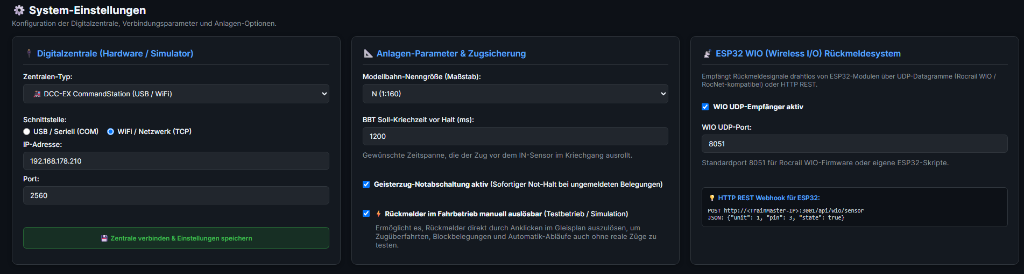
πŸ”Œ Command stations: DCC-EX, Z21 & USB / Wi-Fi Supports common command stations such as the DCC-EX CommandStation, Roco Z21 / z21 or the built-in simulator – via direct USB/serial connection or wirelessly over TCP.
πŸ›‘οΈ BBT braking & ghost-train emergency stop Millisecond-accurate creep-time control (BBT, block brake timer) for a smooth stop before the IN sensor. Built-in ghost-train protection: unannounced occupancy triggers an immediate emergency stop.
πŸ“‘ ESP32 WIO (UDP & REST) + test simulation Wireless feedback via UDP (port 8051) or HTTP REST webhook. Sensors can be triggered with a click on the track plan for dry runs.
localhost:5173 β€” Real-time system log & diagnostics
Live screenshot ● Live logging active
TrainMaster real-time system log in plain language

Real-time system log in clear, plain language

No cryptic data dumps or hex codes: TrainMaster translates bus commands and feedback into plain text – so you can troubleshoot without expert knowledge:
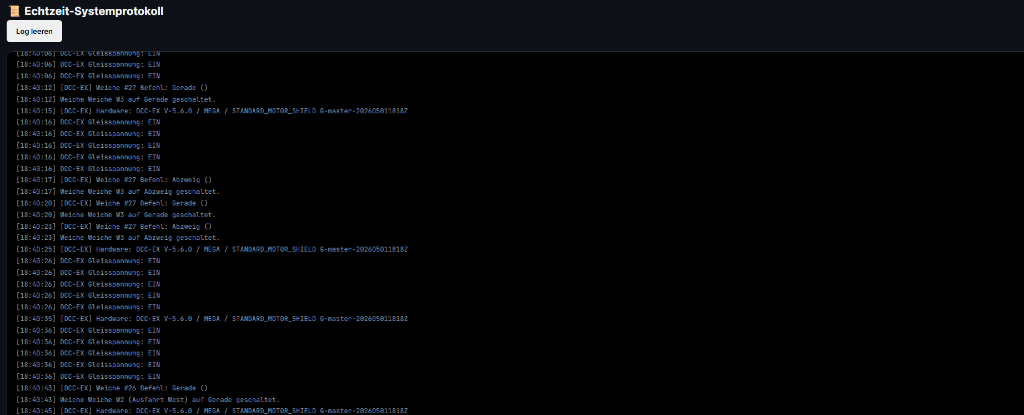
πŸ’¬ Plain text instead of cryptic error codes Track power, turnout changes (e.g. β€œTurnout W2 (west exit) set to straight”) and hardware messages are logged in a way you can understand right away.
⏱️ Complete timestamps & hardware detection Every switching operation can be traced to the second, with automatic hardware detection (e.g. DCC-EX on an Arduino Mega with motor shield).
πŸ› οΈ Easy self-help Connection drops or wrong turnout addresses can be pinpointed in seconds without outside help. Includes a handy one-click β€œclear log” function.
Elgato Stream Deck XL β€” TrainMaster plugin (32 LCD keys)
Live screenshot ● Plugin connected & live
TrainMaster Elgato Stream Deck plugin live screenshot with turnout control, loco throttle and emergency stop

TrainMaster plugin for the Elgato Stream Deck with live status

Turn your Stream Deck (Classic, MK.2, Mini, XL or Plus) into a tactile control panel. Turnout positions, signal aspects, loco speed steps and sounds are shown live on the key displays:

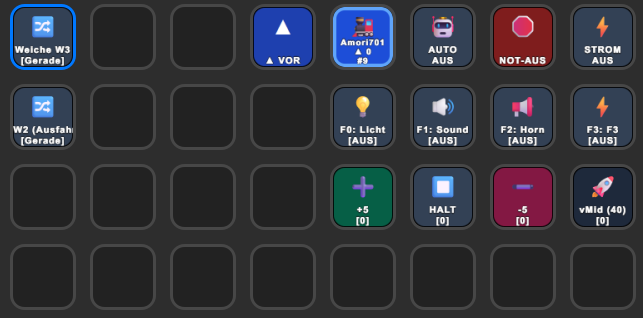
πŸ”€ Tactile panel & turnout control Throw turnouts (e.g. W3, W2 exit) at the push of a key. The current position (straight / diverging) lights up live with a blue frame on the key.
πŸš‚ Loco throttle with live feedback The active loco is always in view (Amori701 β–² 0 #9). Fine-step keys (+5 / βˆ’5 / stop / vMid 40), direction (β–² forward) and loco functions (F0 light, F1 sound, F2 horn) with live on/off status.
πŸ›‘ Instant emergency stop & system control Maximum safety: dedicated keys for emergency stop, track power off and switching between manual and automatic operation (AUTO).

Architecture & core features

Why TrainMaster makes life easier for model railroaders

⚑ Automatic & mixed operation
BBT braking & ghost-train protection
Run fully automatically along routes or drive manually. With a sensitive block brake timer (BBT) for smooth stops and an immediate emergency stop when a ghost train is detected.
πŸ”Œ Open command station support
DCC-EX, Z21, USB & Wi-Fi (TCP)
Direct connection to modern command stations such as the DCC-EX CommandStation or Roco Z21 / z21 via USB or network – including a built-in layout simulator.
πŸ—ΊοΈ Track editor & auto-router
Smart route calculation
Build your track diagram interlocking in the web browser. Automatic calculation of all routes, automatic signal and turnout assignment, and block detection.
πŸ•ΉοΈ Elgato Stream Deck plugin
Tactile key power
Connect your Stream Deck to TrainMaster: full loco control, emergency stop, route selection and turnout control with dynamic status on the keys.
πŸŽ›οΈ Smart rotary knob (Elecrow)
Touch display & RGB LED ring (approx. $30)
Based on off-the-shelf Elecrow hardware (approx. $30). A round touch screen on top for quick train selection, an RGB LED ring for live visual feedback, and the TrainMaster firmware.
πŸ”“ Open source & free
MIT license on GitHub
Full source code, ESP32 firmware, Stream Deck plugin and 3D-printable files are freely available. Use, modify and share – explicitly allowed.
⚑ Custom ESP32 WIO firmware
Open module integration
Our own firmware for standard ESP32 modules: very fast signal control (discrete GPIOs & WS2812 RGB) and current-sensor feedback via UDP (port 8051) or HTTP REST.

Hardware & hands-on control

The bridge between digital software and the physical model railway

πŸ•ΉοΈ

Elgato Stream Deck integration

The TrainMaster plugin (included in the GitHub repository) turns any Stream Deck (Mini, Standard, XL or Plus) into a hands-on control panel. Turnout positions, signal states and routes are shown live on the LCD keys. A single key press is enough for an emergency stop or to set a route.

Supported: Stream Deck Classic, XL, MK.2 & Stream Deck Plus (dial support)
πŸŽ›οΈ

Smart rotary knob (Elecrow ESP32 with touch display & LED ring)

Hands-on model railway control, up to date: we use the off-the-shelf Elecrow ESP32 rotary display/knob module (very affordable at around $30). With the TrainMaster firmware it offers a round touch display on top for fast train selection and a surrounding RGB LED ring for live visual feedback on speed steps, braking and status changes.

Round touch display (train selection) β€’ RGB LED ring (live feedback) β€’ Off-the-shelf $30 hardware β€’ Direct Wi-Fi connection
⚑

Custom ESP32 WIO firmware (signals & sensors)

All signals (discrete LEDs or WS2812 RGB) and feedback sensors (current sensors & contacts) are controlled in real time by our optimised ESP32 WIO firmware. It runs on common standard ESP32 boards and talks to TrainMaster wirelessly via port 8051 (WIO / UDP) or REST webhooks – no expensive proprietary add-on hardware needed.

WIO server port 8051 β€’ 2–4-aspect signals & current sensors β€’ Firmware for standard ESP32 boards

Download & installation

Free and open source under the MIT license – up and running in a few minutes

GitHub repository β†— Download ZIP ↓
1. Install Node.js
Version 18 or newer
Install Node.js once (Windows, macOS or Linux). npm is included in the installer.
2. Get TrainMaster
ZIP or git clone
Unzip the download or run git clone https://github.com/ETSREAC/Trainmaster.git, then run npm install once in the folder.
3. Start & drive
A double-click is enough
Windows: start.bat Β· macOS: TrainMaster_macOS.command. Your browser opens at localhost:5173 – on a tablet, use the PC's IP address. Without a command station everything runs in the built-in simulator. Switch the interface to English with the EN button in the header.

Free to use – support welcome

TrainMaster is an open hobby project and will stay free. Please report bugs and ideas as an issue on GitHub (English or German is fine). If you would like to support further development, you can buy me a coffee – from €25 you get a personal unlock code for the clean edition without support hints in the interface.

Support the project β˜• Report a bug / suggest an idea β†— Send an email βœ‰